The Definitive Guide to QR Code Security in 2026: Protecting Your Data and Your Brand
In 2026, Quick Response (QR) codes are no longer just a novelty found on the back of cereal boxes; they are the connective tissue between our physical and digital worlds. From touchless restaurant menus to complex cryptographic authentication for financial transactions, the QR code is ubiquitous. However, with this widespread adoption comes a significant increase in sophisticated cyber threats. As a professional with over 27 years in healthcare information systems and a background in physics, I have seen how quickly architectural vulnerabilities can be exploited. This guide aims to demystify the technical risks associated with QR technology and provide a roadmap for secure generation and scanning.
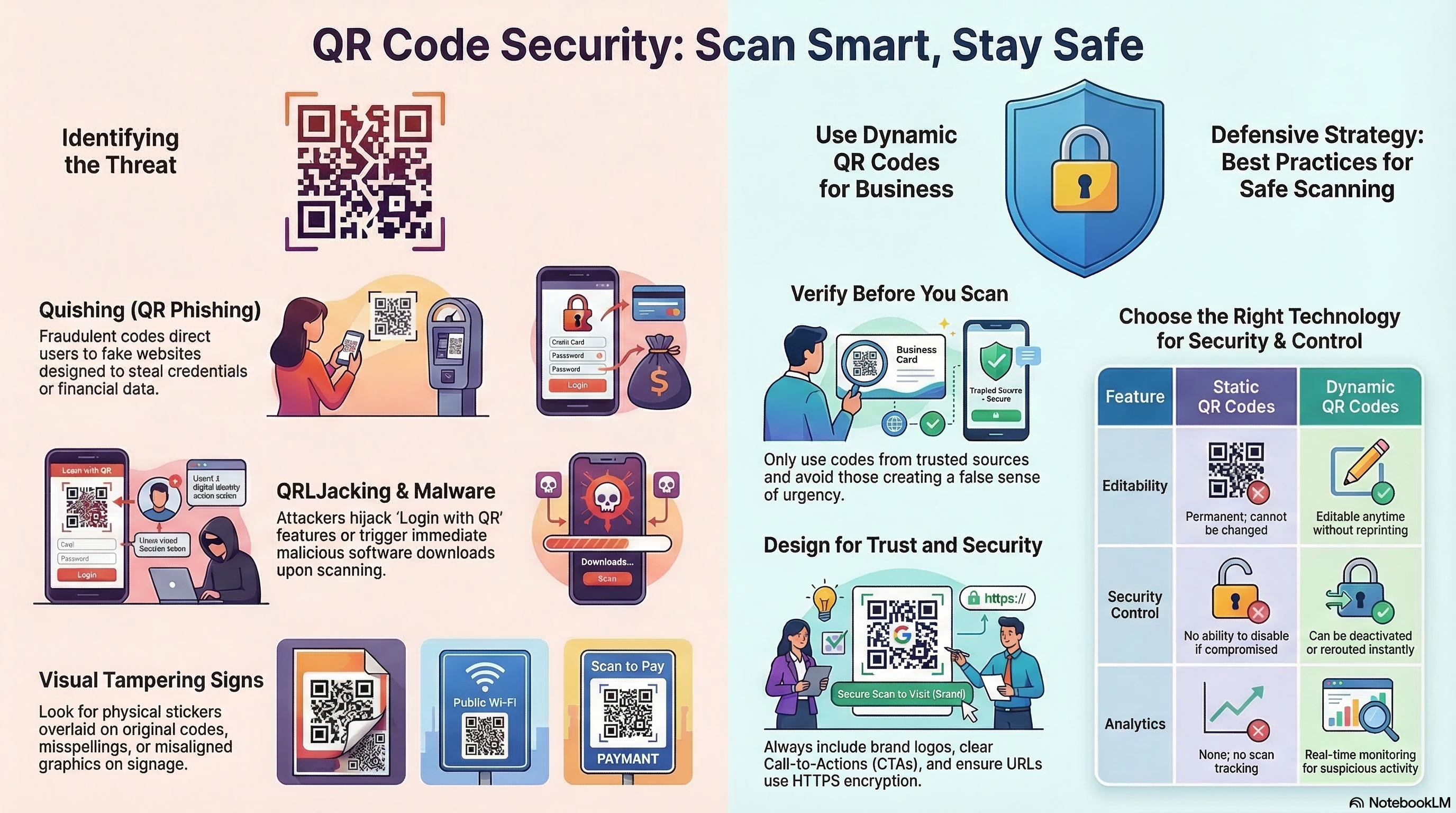
The Rise of "Quishing" (QR Phishing)
The most prevalent threat in the current landscape is Quishing. Unlike traditional email phishing, where a user might be trained to hover over a link to inspect the URL, a QR code is visually unreadable by humans. An attacker can easily overlay a malicious QR code on top of a legitimate one—such as on a public parking meter or a business’s front door.
When a user scans this compromised code, they are redirected to a spoofed website designed to harvest credentials or install malware. Because the initial interaction happens in the physical world, users often have a "halo of trust" around the code that they wouldn't have with a random digital link.
Technical Safeguards: Static vs. Dynamic Codes
Understanding the underlying structure of your QR code is the first step in security.
- Static QR Codes: These encode the destination URL directly into the dot pattern. Once printed, the destination cannot be changed. These are generally safer for long-term use because the "path" is hard-coded.
- Dynamic QR Codes: These use a "redirector" or a shortened URL. While they offer the benefit of tracking analytics and the ability to change the destination URL after printing, they introduce a middleman. If the redirect server is compromised, every QR code created through that service becomes a potential threat.
At linksqrcode.com, we prioritize transparency in how these codes are structured to ensure you know exactly where your data is pointing.
The Privacy Advantage of Local Browser Generation
Most "Free QR Generators" found via search engines operate on a client-server model. When you enter a URL, that data is sent to their server, processed, and a file is sent back to you. This creates a digital footprint of your intent and, in some cases, allows the provider to "scrape" the destination data for marketing purposes.
We take a different approach. By utilizing local browser-based generation, the conversion of your URL into a matrix happens entirely within your device's memory. No data is transmitted to our servers during the generation process. This "Privacy-by-Design" architecture is essential for corporate compliance and personal data sovereignty.
Error Correction Levels: Beyond Scannability
QR codes utilize Reed-Solomon Error Correction, which allows a code to be scanned even if it is partially dirty or damaged. There are four levels:
- Level L (Low): 7% of data can be restored.
- Level M (Medium): 15% restoration.
- Level Q (Quartile): 25% restoration.
- Level H (High): 30% restoration.
For high-security or artistic codes (like our Photo QR or Halftone effects), we recommend Level H. This ensures that even with a logo or image embedded in the center, the data integrity remains uncompromised, and the scanner can accurately parse the intended URL without "guessing" the missing modules.
Best Practices for Businesses and Consumers
To maintain a secure QR ecosystem, follow these "Director-Level" protocols:
- For Businesses: Regularly audit your physical QR codes. Ensure they haven't been covered with stickers. Use a custom design (like our artistic styles) to make it harder for an attacker to create a visually identical "fake" overlay.
- For Consumers: Use a scanner app that previews the URL before opening the browser. Never enter passwords or financial information on a site reached via QR code unless you have manually verified the SSL certificate and domain name.
- For Developers: Always use HTTPS. A QR code pointing to an
http://site is a massive red flag for modern mobile operating systems and will often trigger a security warning that scares away your customers.
Conclusion: Trust But Verify
The QR code is a powerful tool for bridging the gap between offline marketing and online conversion. However, as we navigate 2026, the responsibility of security falls on both the creator and the scanner. By choosing tools that prioritize local processing and high error correction, you are taking a proactive stance against the growing wave of digital scanning threats.