How to Stay Safe: Identifying QR Code Phishing (Quishing) Scams
As QR codes have become ubiquitous in restaurants, parking meters, and advertisements, cybercriminals have taken notice. This has given rise to a new threat: content phishing via QR codes, commonly known as "Quishing."
While QR codes themselves are harmless, they can be manipulated to direct users to malicious websites. This guide will explain how these scams work and, most importantly, empower you with the knowledge to identify and avoid them.
What is Quishing?
"Quishing" is a combination of "QR code" and "phishing." In a traditional phishing attack, a scammer sends an email with a malicious link hoping you click it. In a quishing attack, the scammer places a malicious QR code in a physical or digital location, hoping you scan it.
Because QR codes are not readable by the human eye, you cannot see the destination URL until you scan it, making it easier for attackers to hide their traps.
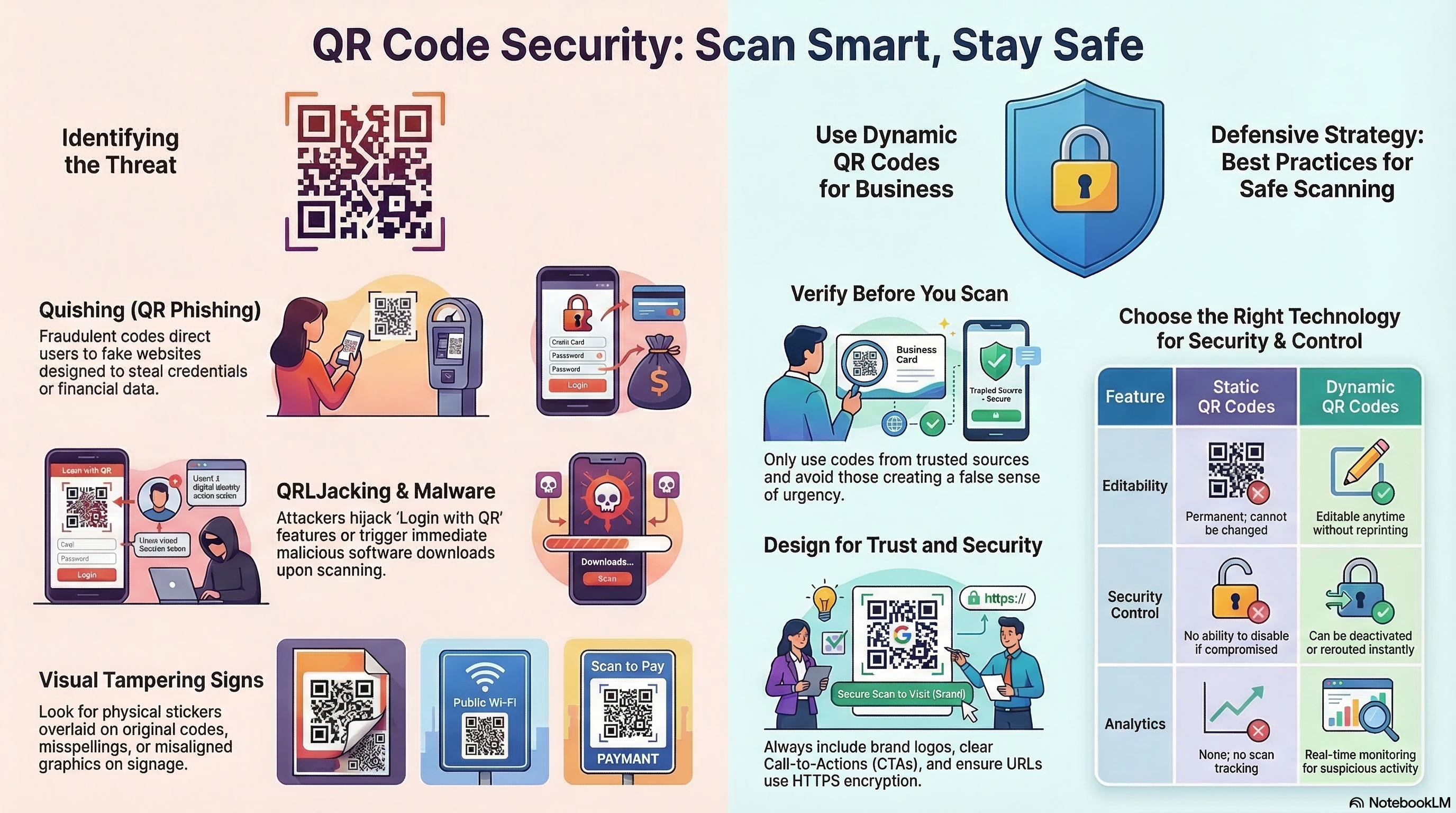
Common Types of QR Code Scams
1. The Parking Meter Swap
Scammers print stickers with their own QR codes and physically paste them over legitimate QR codes on parking meters. Unsuspecting drivers scan the code, think they are paying for parking, but are actually handing their credit card details directly to a thief.2. Fake Violations and Tickets
You find a fake ticket on your windshield with a QR code to "pay the fine online." The urgency of avoiding a penalty tricks users into scanning and paying without verifying the source.3. "Urgent" Account Issues
You receive an email or find a flyer claiming your bank account has been compromised or a package cannot be delivered. The QR code promises a quick fix but leads to a fake login page designed to steal your credentials.How to Spot a Malicious QR Code
Vigilance is your best defense. Look for these red flags:
- Tampering Evidence: If scanning a physical code (like on a poster or meter), feel the surface. is there a sticker pasting over the original code? If it looks added on or peels off, do not scan it.
- Mismatched Context: Be wary of QR codes in unexpected places or those lacking professional branding. A random sticker on a lamppost promising "Free Money" is almost certainly a scam.
- Urgency: Scams rely on panic. "Scan now or lose access!" is a common tactic to bypass your critical thinking.
Safety Best Practices for Scanning
You don't need to stop using QR codes, but you should scan smarter.
1. Preview the URL
Modern smartphone cameras (iOS and Android) will display a small preview of the URL when you hover over a QR code before you tap to open it.- Check the Domain: Does it match the brand? If you are paying for "City Parking," the URL should not be `secure-payment-site-123.com`.
- Look for HTTPS: Ensure the site uses a secure connection (https://), though keep in mind scammers can also get SSL certificates.
2. Never Input Info blindly
If a QR code takes you to a login page or payment portal, stop.- Verify Independently: Instead of logging in through the link, close the browser and navigate to the company's website directly through your browser or app.
3. Check the Source
If you receive a QR code via email from a company, verify the sender's email address. Legitimate banks and service providers rarely ask you to scan a QR code to resolve account security issues.4. Use a Trusted Scanner
While native camera apps are great, some dedicated security apps (like potential future features from trusted antivirus providers) can check the destination URL against databases of known malicious sites."Quishing" in the Corporate Environment
While individual consumers are frequent targets, "Quishing" has increasingly become a threat to corporate security. Attackers use QR codes to bypass traditional email security filters that are designed to scan and block malicious URLs in text. Because a QR code is an image, many legacy filters fail to "read" the link inside, allowing the phishing attempt to reach the employee's inbox or office desk.
- The "HR Update" Scam: Employees receive an email appearing to be from HR, asking them to scan a QR code to review new benefits or compliance documents. The code leads to a fake SSO (Single Sign-On) page.
- Physical Social Engineering: Malicious QR codes are placed on shared office equipment, like printers or coffee machines, under the guise of "Scan for Support" or "Report a Problem."
Your Personal QR Security Checklist
Before you tap that URL preview, run through this quick mental checklist to ensure you aren't walking into a trap:
- Is the source trusted? Did you expect to find a QR code here?
- Is there physical damage? Does the code look like a sticker added later?
- Does the URL match? Does the domain in the preview match the supposed brand?
- Am I being rushed? Is the call-to-action creating artificial panic?
- Am I on a VPN? Using a secure connection adds an extra layer of protection if you happen to land on a suspicious site.
Why Local Generation Matters for Security
At linksqrcode.com, we believe that security starts at the source. Many online generators act as "middlemen," storing the URLs you create and the images you upload on their servers. This creates a data footprint that could technically be intercepted or misused.
Our tool generates the QR matrix entirely inside your browser. This means:
- No URL Logging: We never see the links you are converting.
- No Image Exposure: Your brand logos remain on your local machine.
- Complete Privacy: You are the only person who holds the key to the data you've generated.
The Bottom Line
QR codes are a safe and convenient technology when used correctly. The danger lies not in the code, but in where it leads. By taking a brief second to inspect the physical code, verify the URL preview, and using secure generation tools, you can "outsmart" the scammers and scan with confidence. Stay vigilant, stay informed, and enjoy the convenience of a connected world—safely.
Create Secure, Reliable QR Codes for Your Business at Linksqrcode.com
Stay Informed & Secure
Best Practices Guide →
Essential tips for size, contrast, and high-quality printing.
The Future of QR →
Explore GS1 Digital Links, smart cities, and AI-generated codes.
About Our Privacy Mission →
Learn why we prioritize client-side security and data privacy.
Static vs. Dynamic →
Is a permanent static code or a trackable dynamic code right for you?